The History of Microsoft Access
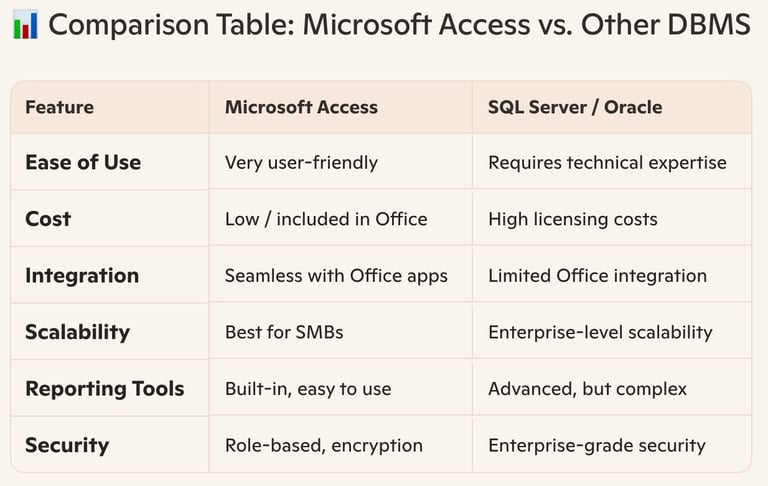
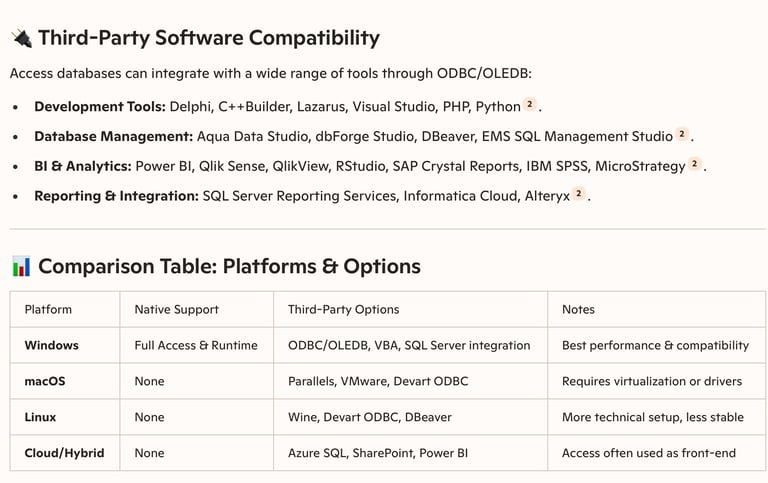
Access database systems release timeline, databases comparisons and available devices to use.
MICROSOFT ACCESS DATABASES
1/9/20262 min read


Benefits of using a database management system.
Microsoft Access offers users a cost‑effective, user‑friendly database management system that integrates seamlessly with Microsoft Office, supports rapid application development, and provides strong reporting and security features—making it ideal for small to medium‑sized businesses and individual professionals.
🌟 Key Benefits of Using Microsoft Access as a DBMS
1. Ease of Use
2. Integration with Microsoft Office
3. Rapid Development
4. Cost‑Effectiveness
5. Data Management & Flexibility
6. Reporting & Analysis
7. Security Features
8. Connectivity with Other Databases
References (5)
1. Advantages and Disadvantages of Microsoft Access: Explore. https://www.theknowledgeacademy.com/blog/advantages-and-disadvantages-of-microsoft-access/
2. What is Microsoft Access? - Uses, Features, & Benefits in 2026. https://www.netcomlearning.com/blog/what-is-microsoft-access-a-complete-guide
3. Top 10 Advantages of MS Access Over Other DBMS - TechBloat. https://www.techbloat.com/top-10-advantages-of-ms-access-over-other-dbms.html
4. What is MS Access Used For? | Key Features & Benefits Explained. https://accessdeveloper.net/what-is-ms-access-used-for/
5. 9 Benefits of using Microsoft Access - populartechworld.com. https://populartechworld.com/9-benefits-of-using-microsoft-access/
The History of Microsoft Access
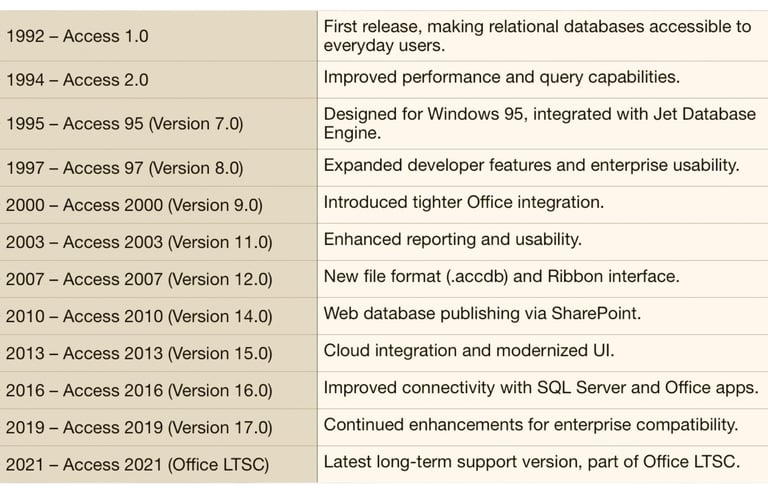
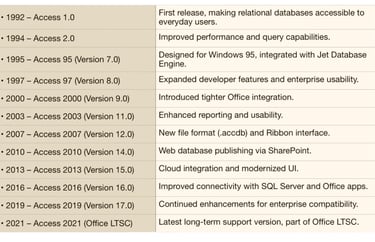
Microsoft Access was first released in November 1992 as part of Microsoft’s push to make relational databases accessible to everyday users. Since then, it has evolved into a powerful desktop database system integrated with the Office suite. Databases secure your data through layered protections such as encryption, access controls, backups, and auditing, ensuring confidentiality, integrity, and availability of information.
✅ Takeaway
This timeline highlights how Microsoft Access evolved from a simple desktop database tool into a robust system integrated with Office and cloud services. Each release added features that improved usability, connectivity, and enterprise readiness, ensuring Access remains relevant for small businesses and individual users.
✅ Takeaway
Microsoft Access revolutionized desktop database management by making relational systems user-friendly and widely available. On your computer, databases secure data through authentication, encryption, backups, and monitoring, ensuring that your information remains safe, reliable, and accessible only to authorized users.