Microsoft Access Security
Review how assess security option keep your database safe.
MICROSOFT ACCESS DATABASES
iBeauty Consulting Group
1/13/20262 min read
Microsoft Database Security
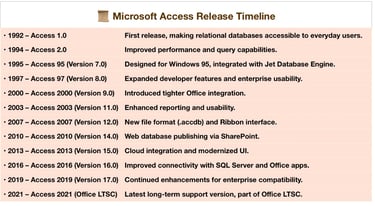
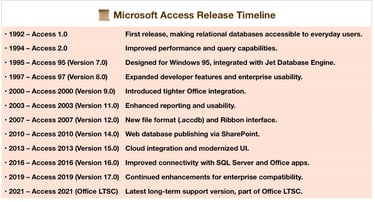
Microsoft Access was first released in November 1992 as part of Microsoft’s push to make relational databases accessible to everyday users. Since then, it has evolved into a powerful desktop database system integrated with the Office suite. Databases secure your data through layered protections such as encryption, access controls, backups, and auditing, ensuring confidentiality, integrity, and availability of information.
Key Impact
Microsoft Access democratized database management by lowering the barrier to entry. Small businesses and individuals could build relational databases without needing enterprise-level systems like Oracle or SQL Server.
🔒 How Databases Secure Your Data
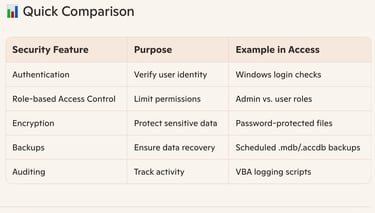
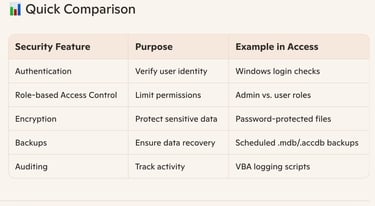
Database security ensures that sensitive information stored on your computer or server is protected from unauthorized access, corruption, or loss. Core mechanisms include:
• Authentication & Access Control• Usernames, passwords, and role-based permissions restrict who can view or modify data.
• Windows login integration allows Access databases to leverage operating system credentials.
• Encryption• Data can be encrypted both at rest (stored on disk) and in transit (moving across networks).
• Prevents attackers from reading sensitive information even if they gain access.
• Backups & Recovery• Regular backups protect against accidental deletion, corruption, or hardware failure.
• Recovery tools ensure data can be restored quickly.
• Auditing & Monitoring• Logs track who accessed or modified data, helping detect suspicious activity.
• Monitoring tools alert administrators to potential breaches.
• Patch Management & Updates• Keeping database software up to date prevents exploitation of known vulnerabilities.
• Outdated systems are prime targets for attackers.
• Physical & Network Security• Firewalls, secure servers, and restricted physical access add extra layers of protection.
• Databases rely on the broader IT infrastructure for holistic security.
✅ Takeaway
Microsoft Access revolutionized desktop database management by making relational systems user-friendly and widely available. On your computer, databases secure data through authentication, encryption, backups, and monitoring, ensuring that your information remains safe, reliable, and accessible only to authorized users.